

Campus Management System

To log in to SAP SLcM (CMS), please use your university ID and password.

Log In.

In the future, all students at the University of Münster will be fully managed in SAP SLcM. The transition will be phased in, and only students starting their first semester at the time of the switchover will be affected. The master program "Geoinformatics and Spatial Data Science" was switched in the summer semester 2025. Students in higher semesters will continue to be managed in HISLSF until 2030. The Bachelor of Geoinformatics program is an exception to this rule, as all students are already managed in SLcM.

Note: The following instructions are also available in German.


General information on course registration

There are two types of credit that might have to be registered for each course: exam ("Prüfungsleistung") and required coursework/attendance ("Studienleistung"). Note that some courses may only have a final exam (e.g. lectures). 

For IFGI courses, you do not have to register before the start of the semester - just make sure to attend the first session. The registration for the exam and coursework generally starts 4 weeks after the beginning of the lecture period. The period ends in mid-December or mid-June. De-registration are possible until the first week of January or July. 

Some modules require a final module examination (MAP) for completion. These also have to be registered separately. 

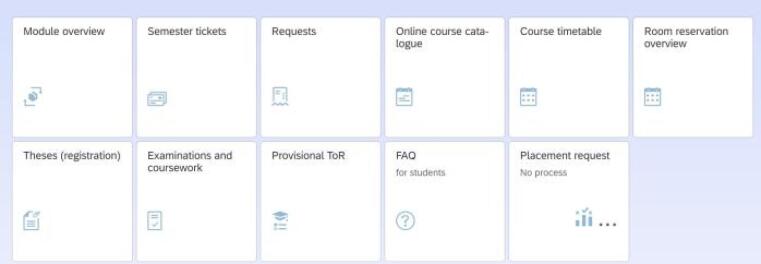
Overview Campus Management


© Uni Münster
  • Module Overview

    This app displays all modules you have started and completed. Modules you have started are shown at the top of the list. A module is considered started when you register for a course. The module overview in the app shows all courses you have registered for and all registered exams and coursework.

    Completed modules are listed below the modules you have started. The module grades for these modules are displayed in the upper right corner.

  • Online Course Catalogue

    When you use this app, you will automatically be taken to the "My Studies" tab. Here, you can navigate to the module level for the modules you are looking for and then open the details (on the far right side of the screen).

    Courses can be saved or booked in the "Courses" tab. Once you have booked a course, the module and the course will be displayed in the app's module overview and in your timetable. Booking a course is necessary, so credit for the required coursework can be given, if applicable. 

    Exam registrations can be found in the "Examinations" tab. Here, you can register for all final exams. Once registered, an achievement will be displayed in the app's "Examinations and Coursework".

    Please note that a module is only considered passed once all required courses, exams, and the corresponding coursework have been booked and completed.


  • Course Timetable

    This app provides a calendar overview of booked courses and exams.

  • Theses (Registration)

    You register your thesis in this app. You must choose a primary supervisor and propose a topic. The primary supervisor will then adjust the topic if necessary and accept the supervision. Finally, the examination office must confirm the thesis, before processing time begins.

  • Examinations and Coursework

    This app displays of all registrations you have made in the current semester, both final exams and required coursework. Clicking on one of the registered entries will take you back to the course catalog. There, you can de-register from the exam within the de-registration period.

    Once your grades have been entered, you can also get an overview here.

  • Provisional ToR

    This app allows you to generate a verifiable Transcript of Records (ToR). Verification is done via a QR code. You can choose to have the ToR issued in German or English. The language changes depending on your system settings. The preliminary ToR always lists failed attempts, while the final ToR does not.